Cute Snowmen Set: A Practical Guide for Creators and Crafters
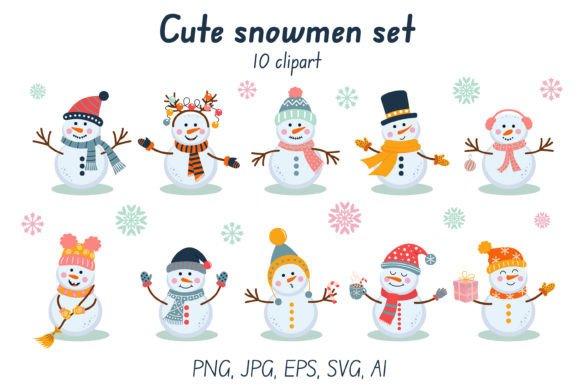
Winter designs are a staple for many creative businesses, but finding assets that truly work across different mediums can be frustrating. The Cute Snowmen Set addresses this need by offering a versatile collection of 10 distinct clipart images featuring cheerful snowmen in scarves and hats. For entrepreneurs running print-on-demand shops, hobbyists making holiday cards, or designers creating digital invitations, having high-quality, multi-format files is essential. However, simply downloading a file pack does not guarantee a professional result. Many creators overlook critical technical details until they are halfway through a project, leading to wasted time and subpar products.
Understanding the Value of Multi-Format Files
The primary advantage of this specific set lies in its comprehensive file structure. Unlike many generic clipart packs that offer only low-resolution JPEGs, this collection includes PNG files with transparent backgrounds, SVG vectors, JPGs on white, and editable AI and EPS source files. This variety is not just a marketing feature; it is a functional necessity for scaling your designs.
When you design for a tumbler, you need a transparent PNG to ensure the image blends seamlessly with the mug's color. Conversely, if you are printing a greeting card on white paper, a JPG on a white background might suffice. But if you plan to resize a snowman from a small sticker to a large pillow cover, raster images like PNG or JPG will eventually pixelate. This is where the included SVG, AI, and EPS files become indispensable. They allow you to scale the artwork infinitely without losing crispness. Ignoring the difference between these formats is a common mistake that leads to blurry prints and disappointed customers.
Common Mistakes When Using Clipart Assets
Even with a robust set like the Cute Snowmen Set, users often make avoidable errors during the application phase. One frequent oversight is assuming that "high resolution" means the same thing for every use case. While the set provides images at 300 dpi and dimensions up to 6250 x 4167 pixels, placing a 12-inch design onto a 24-inch banner without converting to vector format will result in visible jagged edges. Beginners often fail to check the actual physical dimensions their software displays before sending a file to production.
Another significant misunderstanding involves color models. The files in this set utilize the RGB color model, which is perfect for screens, web design, and standard inkjet printers. However, if you intend to send your design to a professional offset printer for bulk t-shirt production or packaging, RGB colors may shift when converted to CMYK. Without checking your printer's requirements, vibrant red scarves might turn out muddy brown. This isn't a flaw in the art itself, but a failure in the workflow preparation.
Furthermore, many creators download a ZIP file and immediately try to open all contents in one program. Trying to edit an AI file in a basic photo editor, or opening an SVG in a program that doesn't support vector paths, leads to frustration. It is crucial to match the file type to your software capabilities. If you do not have Adobe Illustrator, the AI and EPS files are less useful unless you convert them first using compatible software.
Optimizing Your Workflow for Better Results
To get the most out of the Cute Snowmen Set, you should adopt a strategic approach to file management. Before starting any project, unzip the folder and organize the files into separate directories based on their format. Keep your PNGs for quick mockups and web use, and reserve the SVG and AI files for final print-ready layouts. This simple organizational step prevents accidental downgrading of quality later in the process.
Always verify the DPI settings in your design software. Even though the source files are 300 dpi, some programs default to 72 dpi when importing. Ensure your canvas is set to 300 dpi for print projects to maintain the sharpness of the snowmen's features, such as the texture of their knit hats or the folds in their scarves. For digital projects like website banners or social media posts, 72 dpi is acceptable, but the larger pixel dimensions provided (up to 6250 px) ensure your images remain crisp even on high-density retina displays.
If you are working on custom merchandise like pillows or bags, consider how the design interacts with the fabric. The transparent PNGs in this set are ideal for this, allowing the texture of the material to show through the negative space. However, always create a mockup before committing to a full production run. Use the high-resolution JPGs on white to visualize how the design looks against a neutral background, which helps in assessing contrast and readability.
Evaluating Quality Before You Commit
Before integrating the Cute Snowmen Set into your business, take a moment to evaluate the specific needs of your audience. Are you targeting parents looking for nursery decor, or fashion-forward adults wanting trendy winter apparel? The playful style of these snowmen fits well for children's items, party invitations, and cozy home goods like mugs and albums. However, for a sleek, modern corporate holiday campaign, the whimsical nature of these characters might feel too casual.
Check the licensing terms associated with the purchase. While the description mentions a wide range of uses including shirts, stickers, and web design, always confirm if there are restrictions on resale or the number of end products allowed. Understanding these boundaries protects your business from legal issues and ensures you are using the assets ethically.
Finally, remember that the best design tools are only as good as the user's attention to detail. The Cute Snowmen Set provides the raw materials—10 unique elements in multiple formats—but the final outcome depends on how you assemble them. By respecting the differences between vector and raster files, managing your color profiles correctly, and organizing your workflow efficiently, you can transform these digital assets into high-quality, marketable products. With care and precision, these cheerful snowmen can become the highlight of your winter collection, bringing warmth and joy to your customers' lives.