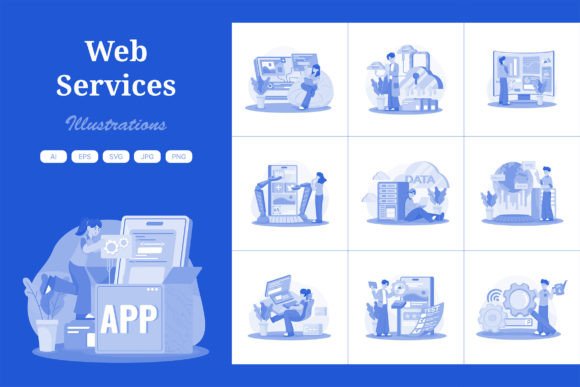
M709 Web Services Illustration Pack
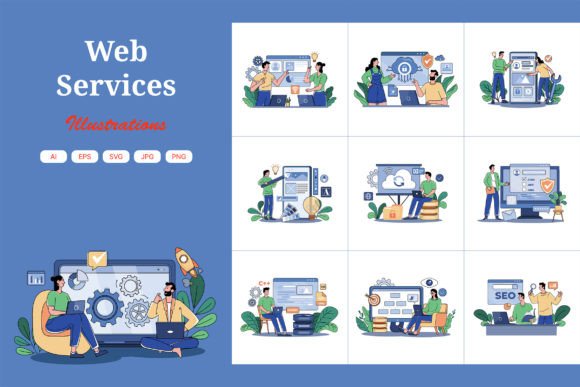
Visual storytelling is the backbone of modern digital communication, yet finding the right imagery can often feel like searching for a needle in a haystack. Generic stock photos rarely capture the specific vibe of a brand, while custom illustrations from scratch are expensive and time-consuming. This is where the M709_Web Services Illustration Pack steps in as a practical solution for designers, entrepreneurs, and content creators alike. It offers a curated collection of flat design elements specifically tailored to represent web services, technology, and digital workflows. Whether you are launching a new SaaS product, updating a corporate blog, or building a portfolio, this pack provides the visual foundation needed to make your project stand out without breaking the bank.
Why Custom Vector Art Matters for Your Brand
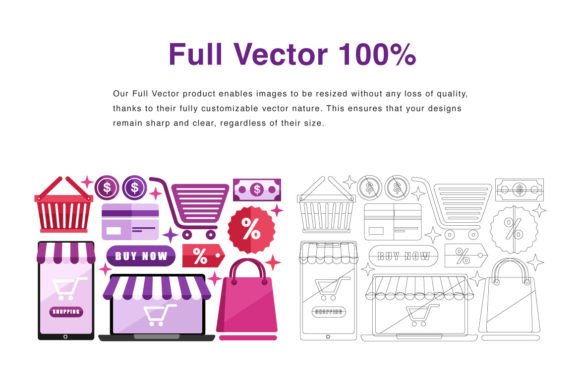
In the crowded digital landscape, your website's header section is often the first thing a visitor notices. A generic image might fail to convey trust or professionalism, but a unique illustration can instantly communicate your value proposition. The M709 pack is designed with this critical real estate in mind. Unlike static raster images that pixelate when enlarged, these assets are built using vector graphics. This means they are infinitely scalable. You can use them for a small mobile app icon or stretch them across a massive desktop banner without losing any clarity or sharpness.
The appeal of this collection lies in its flexibility. Every shape within the illustrations is distinct and editable. If your brand guidelines demand a specific shade of blue or a particular gradient, you can adjust the colors of every element to match perfectly. This level of customization ensures that the final output feels bespoke, even though it starts from a pre-made template. For small business owners and freelancers who lack a dedicated design team, this capability bridges the gap between professional polish and budget constraints.
Understanding the Flat Design Aesthetic
The illustrations in the M709_Web Services Illustration Pack follow a clean, flat design style. This aesthetic has become a staple in modern web and application interfaces because it reduces visual clutter and improves readability. Flat design focuses on simplicity, using bold colors and clear shapes rather than realistic textures or heavy shadows. This approach not only looks contemporary but also loads faster on websites, contributing to better user experience and SEO performance.
For beginners entering the world of digital marketing or web development, working with flat design is less intimidating. The shapes are intuitive, making it easier to understand how different components interact. When you combine these elements, you create a cohesive visual language that guides the user's eye through your content. Whether you are explaining a complex data migration process or showcasing a simple login feature, the flat style keeps the focus on the message rather than distracting details.
Practical Applications Across Digital Platforms
The versatility of the M709 pack extends far beyond a single use case. Its primary strength is the ability to adapt to various formats and platforms. Let's explore how different users can leverage these assets to meet their specific goals.
- Website Headers and Hero Sections: As mentioned, the high-resolution nature of these files makes them perfect for the top of your homepage. You can resize the artwork to fit full-width banners or split-screen layouts, ensuring your site makes a strong first impression.
- Mobile App Interfaces: Developers can extract individual icons or scenes to illustrate features within an app. Since the files are vectors, they will look crisp on high-density retina displays common in modern smartphones.
- Presentation Decks: Educators and consultants often struggle to find visuals that don't look cheesy in PowerPoint or Keynote slides. These illustrations add a layer of sophistication to pitch decks, helping to visualize abstract concepts like cloud computing, cybersecurity, or customer support.
- Social Media Graphics: Marketers can crop and recombine elements to create engaging posts for LinkedIn, Twitter, or Instagram. The ability to change colors allows you to maintain brand consistency across all social channels.
Combining Elements for Unique Creations
One of the most powerful features of the M709_Web Services Illustration Pack is the ability to mix and match. Instead of being limited to ten static images, you effectively have a toolbox of components. You might take a character from one illustration, a device from another, and a background shape from a third to build a completely new scene. This modularity encourages creativity and ensures that no two projects look exactly the same, even if they originate from the same source file.
For example, if you are creating a landing page for a remote work tool, you could combine a laptop icon, a video call bubble, and a calendar graphic into a single composition. By adjusting the perspective and color palette, you transform standard assets into a narrative that tells your specific story. This approach saves hours of drawing time while still delivering a result that feels original and tailored.
Technical Specifications and File Formats
When investing in digital assets, understanding the file formats is crucial for long-term usability. The M709 pack comes with a comprehensive suite of files to cover every workflow. You receive 10 AI (Adobe Illustrator) files and 10 EPS files, which are the industry standards for vector editing. These formats allow you to open the artwork in Adobe Illustrator or compatible software, access every anchor point, and modify paths, strokes, and fills with precision.
For users who do not have access to professional vector software, the pack also includes 10 JPG and 10 PNG files at a resolution of 4680×3120 pixels. These high-quality raster versions are ready to drop directly into WordPress, Wix, Squarespace, or other content management systems. Additionally, the inclusion of 10 SVG files ensures compatibility with modern web browsers, allowing developers to embed the graphics directly into HTML code for optimal performance and accessibility.
What to Consider Before You Start
While the M709_Web Services Illustration Pack is highly versatile, there are a few things to keep in mind to get the best results. First, ensure you have the necessary software to edit the vector files. While Adobe Illustrator is the primary compatible program, free alternatives like Inkscape or Affinity Designer can also handle AI and EPS files effectively. Second, consider your brand's color psychology. Because the colors are easily customizable, take the time to align them with your existing logo and marketing materials to maintain a unified identity.
Finally, remember that while these illustrations are excellent starting points, they work best when integrated thoughtfully into your overall layout. Avoid overcrowding your design; let the white space breathe around the illustrations to enhance their impact. By treating these assets as flexible tools rather than finished products, you unlock their full potential to elevate your digital presence.
The M709_Web Services Illustration Pack represents a smart investment for anyone looking to improve their visual communication. It balances professional quality with ease of use, offering a solution that scales from hobbyist projects to enterprise-level applications. Whether you are a beginner learning the ropes of design or a seasoned marketer needing quick, high-quality assets, this collection provides the flexibility and reliability needed to succeed in today's fast-paced digital environment.